Call History Manager for Business: Apps, Tips, and Features

Never miss a business call, track, organize, and analyze every conversation with a smart call history app to improve efficiency and grow your business.

Author: Sujith Grandhi

Call History Manager

Contents

Thousands are already using Qoli. What are you waiting for?

Follow us on

Every missed call could be a missed opportunity, a potential client, a sales lead, or a critical team update slipping through the cracks. Managing dozens of calls manually is stressful, so having a call history manager makes it much easier to stay on top of things.

Studies show 62% of calls to small businesses are missed, highlighting the need for a reliable call history app to capture every opportunity. With the right tool, you can easily track, organize, and analyze every call. Imagine instantly knowing which clients called, how long the conversation lasted, and spotting patterns that can boost productivity and efficiency, all from one dashboard.

In this guide, you’ll learn:

  • What a call history manager really is and why it’s crucial for businesses
  • Features that make these apps indispensable for busy professionals
  • The top call history managers in 2025
  • Actionable tips to manage call history effectively and never miss a beat

By the end, you’ll see how a Call History Manager can transform your call workflow from chaos into clarity, so you can focus on growing your business, not just tracking calls.

Key Takeaways

  • Missing calls means missing opportunities, 62% of small business calls go unanswered.
  • A call history manager keeps every call organized, backed up, and easy to track.
  • Features like analytics, CRM integration, and secure storage help teams work smarter.
  • Businesses improve client relationships and team accountability with call insights.
  • Choosing the right app, like Qoli, turns call data into growth opportunities.
  • Effective management is less about storage and more about using call history as a business intelligence tool.

🔍 Did you know?

  • Businesses lose an average of $126,360 annually due to unanswered calls, showing the real cost of missed communication.

What Is a Call History Manager?

A call history manager is a software that allows users to view, organize, and manage their call logs and history more effectively than a phone’s built-in call log. It often includes features like automatic backups, detailed call statistics, and the ability to restore deleted calls.

This software gives users better control over their call data, keeps call history organized and accessible, and provides insights into calling patterns. Whether for managing client communications or personal calls, a call history manager helps users stay organized, track important interactions, and manage their calls efficiently.

Why Do Businesses Need a Call History Manager?

In business, every call matters. Missed calls, lost follow-ups, or disorganized call logs can lead to lost opportunities, delayed decisions, and frustrated clients. A Call History Manager helps businesses stay organized, track interactions, and improve communication efficiency.

Here’s why it’s essential:

  • Monitor Client Communications: Keep accurate records of all client calls to ensure timely follow-ups and maintain strong relationships.
  • Track Team Performance: Managers can review call logs to understand employee productivity and address workflow bottlenecks.
  • Ensure Accountability: Having a detailed record of calls helps maintain transparency and accountability across the team.
  • Analyze Call Data: Insights into call patterns, duration, and frequency can inform better business decisions and optimize workflows.
  • Secure Call Records: Many call history managers include secure backups and restore options, protecting critical business communication from accidental loss.

By using a call history manager, businesses can reduce missed opportunities, improve client satisfaction, and streamline team communication, making it a vital tool for modern business operations.

Must-Have Features in a Business Call History Manager

Not all call history managers are the same. For businesses, the right software should go beyond just storing call logs. With 85% of customers unlikely to call back after a missed call, it’s crucial to have features like instant call tracking and alerts that save time, improve team efficiency, and ensure no client is left unattended.

Here are the must-have features to look for:

  • Comprehensive Call Logs: Easy access to incoming, outgoing, and missed calls with detailed information.
  • Advanced Search & Filters: Quickly find important calls using date, duration, or contact-based filters.
  • Automatic Backups: Secure storage of call records to prevent accidental data loss.
  • Restore Deleted Calls: Ability to recover important call entries that were mistakenly removed.
  • Analytics & Insights: Statistics on call frequency, duration, and patterns to guide business decisions.
  • Multi-Device Sync: Access call history across desktops, mobiles, or cloud accounts.
  • Data Security & Privacy Controls: Protect sensitive client and business information from unauthorized access.
  • Integration with CRM/Business Tools: Seamless connection with customer management or team productivity platforms.

Note: When evaluating a call history app, focus on whether it provides control, insights, and security, the three pillars that make it valuable for business use.

🔍 Did you know?

  • In industries like legal services, healthcare, and home services, missing just two calls per day can result in over $8,800 in lost revenue annually.

Best Call History Manager Apps for Businesses (2025)

With so many apps available, choosing the right Call History Manager can be challenging. To save you time, here are some of the best options for businesses in 2025

1. Qoli

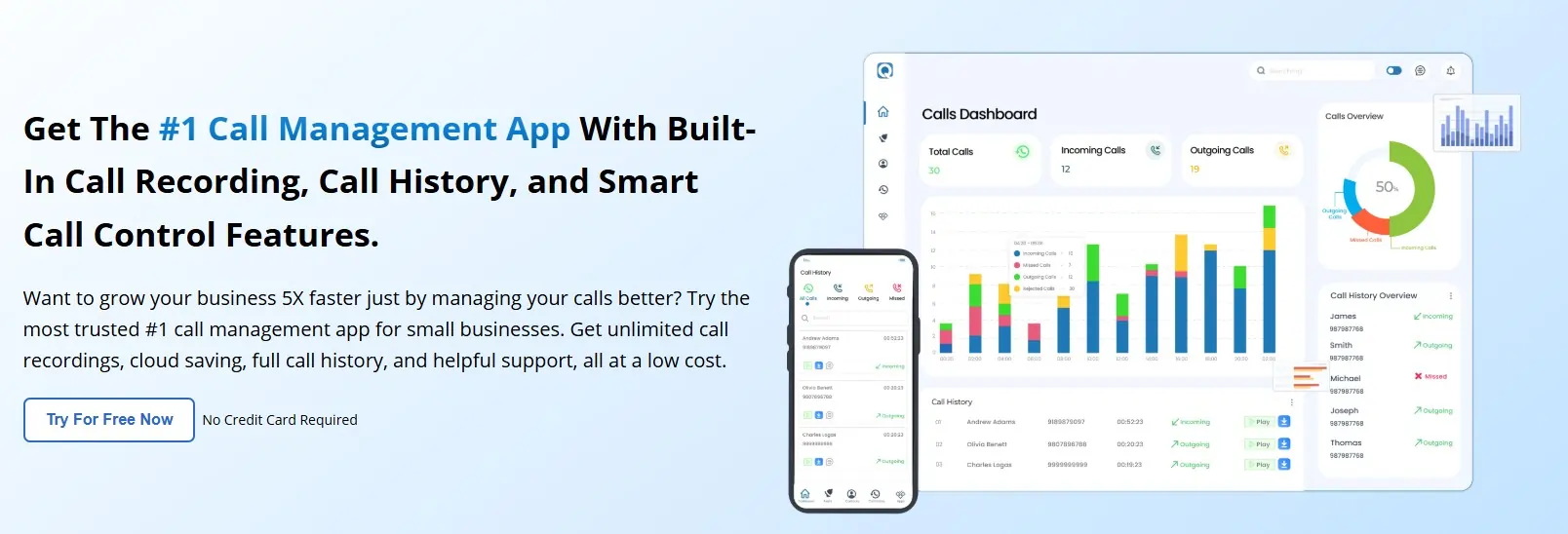
Qoli is a standout call history manager for businesses, offering more than just call log tracking. It combines detailed call management with advanced monitoring tools, making it a powerful choice for companies that want both organization and oversight in a single software solution.
qoli-ai

Features

  • Complete call history tracking with advanced search and filters
  • Call recordings, SMS access, and contact logs
  • Real-time GPS tracking and geofencing
  • Screen time and app usage monitoring
  • Secure backups and restore options for call data
  • Access to past call data for up to 3 months
  • Call analysis reports for insights on calling patterns.
  • Block and manage numbers effortlessly
  • Record and listen to calls anytime
  • CRM integrations for seamless business workflow
  • And many more standout features.

Pros

  • Combines call history with broader monitoring features
  • User-friendly dashboard for managers and teams
  • Works seamlessly across devices

Why It Stands Out

Unlike basic apps, Qoli goes beyond call history. It’s built for businesses that need visibility, compliance, and productivity insights in one platform.

Ideal For

Businesses that want more than just a basic call log, teams that demand full control over every call, complete visibility into activity, and powerful insights to drive results.

Pricing: Plans start at just $4.9/month, a smart investment for businesses that want complete call control.

Rating: Trusted by users worldwide, with a star Created with Sketch. 4.8/5 rating, Qoli stands out as a top choice for businesses.

Ready to take control of your calls? Try Qoli, your smarter call history manager!

Book Demo

2. CallHippo

CallHippo is a reliable call log monitoring software designed for businesses that need virtual phone systems combined with detailed call tracking. It’s ideal for teams that want efficient communication and actionable insights without complexity.

Features

  • Virtual business phone system with call tracking
  • Detailed call analytics and reporting
  • CRM integrations (HubSpot, Zoho, Salesforce)
  • Multi-device access for seamless workflow
  • Easy call transfer, hold, and conferencing options

Pricing: Plans start at $25 per user/month, with different tiers depending on features and team size.

Rating: star Created with Sketch. 4.4/5 user ratings on sites like Capterra India and Software Advice

3. RingCentral

RingCentral is one of the most established communication platforms that doubles as a call history manager for businesses. It’s best suited for teams that want all-in-one communication with detailed call records and analytics.

Features

  • Complete call log tracking with advanced filters
  • Call recording and transcription for better documentation
  • Team messaging, video meetings, and a phone system in one platform
  • AI-powered analytics for call insights
  • Seamless integrations with CRM and business tools (Salesforce, Microsoft, Google Workspace)

Pricing: Starts at $20 per user/month, with different tiers depending on features and team size.

Rating: star Created with Sketch. 3.7/5 user ratings on sites like ambition box and glassdoor.co.in

4. Dialpad

Dialpad is a modern cloud-based communication platform that also works as a call history manager. Known for its AI-powered voice intelligence, it helps businesses not only track calls but also analyze conversations for better outcomes.

Features

  • Call history logs with detailed tracking
  • AI-powered call transcription and real-time insights
  • Automatic voicemail transcription
  • Integrations with Slack, Salesforce, HubSpot, and Google Workspace
  • Analytics dashboard for call activity and team performance

Pricing: Starts at $15 per user/month, with different tiers depending on features and business size.

Rating: star Created with Sketch. 4.2/5 user ratings on sites like Capterra India

5. Callyzer

Callyzer is a call history manager app that focuses on analyzing call logs and patterns. It’s mainly used for organizing call history and generating reports, making it suitable for businesses or individuals who want clear records of call activity.

Features

  • Detailed call log tracking and analysis
  • Categorize calls into incoming, outgoing, and missed
  • Call duration reports to measure communication time
  • Export call data for reports and records
  • Simple interface for quick access to past call history

Pricing: Paid plans start at $2.99/month for premium features.

Rating: star Created with Sketch. 4.5/5 user ratings on Google Play

Benefits of Using a Call History Manager

A call history manager does more than just store call logs. For businesses, it creates a structured system to track communication, improve workflows, and protect critical data. Here are the key benefits:

  • Improves Organization: All calls are recorded, categorized, and easy to access, reducing the risk of missed follow-ups or misplaced information.
  • Better Client Management: Detailed call records help maintain consistent communication with clients, ensuring timely responses and stronger relationships.
  • Team Productivity Tracking: Managers can see how time is spent on calls, identify patterns, and make adjustments to improve efficiency.
  • Data-Driven Insights: Analytics on call duration, frequency, and trends support smarter decision-making and business strategy.
  • Secure Communication Records: Automatic backups and restore options protect valuable call data from accidental loss or device changes.
  • Compliance and Accountability: Having a reliable record of business

    A call history manager is not just about storing logs, it’s about turning raw call data into useful insights that drive business growth.

    Tips to Manage Call History Effectively

    Even with the right call history manager, how you use it makes the difference. Here are some proven tips to keep your call data clean and useful:

    • Set Regular Backups: Enable automatic backups so no important call record is lost. This also makes switching devices easier.
    • Use Filters and Tags: Categorize calls by client, project, or priority. It saves time when you need to retrieve specific information later.
    • Monitor Team Usage: Review call logs weekly or monthly to understand how teams are spending their time and identify areas for improvement.
    • Integrate With CRM Tools: Sync call history with your CRM so all client communication is stored in one place for easy access.
    • Track Call Metrics: Use analytics to monitor duration, frequency, and missed calls. Spotting patterns early helps improve response times and efficiency.
    • Set Access Controls: Limit who can view or edit call records to protect sensitive client or business data.

    By applying these practices, your call history manager becomes more than just a storage tool, it becomes a business intelligence asset.

    Wrapping Up: Take Control of Business Calls

    Now you know what a call history manager is and why it’s essential for businesses. You’ve seen the features that make managing calls easier, how it can improve team productivity, and the benefits of turning raw call data into actionable insights.

    Choosing the right call history manager helps you track every interaction, organize your call records, and ensure nothing important slips through the cracks. It’s not just about storing numbers, it’s about creating clarity, accountability, and smarter business decisions.

    By managing your call history effectively, you can strengthen client relationships, streamline team communication, and make sure every call contributes to your business growth.

    Start using a reliable call history app today, manage your calls efficiently, and turn every missed opportunity into a growth opportunity for your business.


    sujith-kumar-grandhi

    Sujith Kumar Grandhi

    Visweswara Sujith Kumar Grandhi is a content writer and tech enthusiast who turns fresh ideas into content that connects. He’s always exploring new digital trends. Outside writing, he enjoys listening to music, exploring new places, and thinking up ideas, with his phone never too far away. He brings curiosity and energy to every team he joins.

    Want 30% Off? Act Fast!

    Last chance! Get 30% off all Qoli features before this limited-time deal disappears forever.